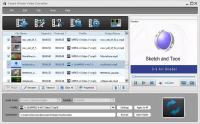
Tipard iPhone Video Converter can convert almost all videos, including HD videos, to MP4 and H.264 video formats for iPhone, iPhone 3G/3GS/iPhone 4. It can also extract audio from any video and convert audio to iPhone/iPhone 3G audio formats.
Tipard iPhone Video Converter can convert almost all videos, including HD videos, to MP4 and H.264 video formats for iPhone, iPhone 3G/3GS/iPhone 4. This iPhone Video Converter can also extract audio from any video and convert audio to iPhone/iPhone 3G audio formats.
Plus, with newly adopted NVIDIA CUDA technology and multi-core CPUs supporting technology, the converting speed is 6X faster. And it can support English/French/German/Japanese four interface languages now.
Key functions:
1.Convert video to iPod/iPhone/Apple TV
Tipard iPhone Video Converter gives you a hand to convert all videos to iPhone/iPhone 3G/3GS/iPhone 4 MP4 and H.264 video formats, even from the HD videos.
2.Extract audio from video to iPhone
Tipard iPhone Video Converter makes it easy to convert all popular audio files or extract audio from videos to MP3, AAC, AIFF, M4A, and WAV for iPhone, iPhone 3G, iPhone 3GS, iPhone 4.
3.Convert video to image
This iPhone Video Converter enables you to capture any video frame and save it as JPEG, BMP or GIF picture.
4.Choose audio track and subtitle
Select your preferred audio track and subtitle or remove the one you do not need.
5.Select profile
Tipard iPhone video converter enables you to choose your needed format for the output video.
6.Support iPhone, iPhone 3G, iPhone 3GS, iPhone4 even all iPod devices
Tipard iPhone Video Converter supports iPhone, iPhone 3G, iPhone 3GS, iPhone4, even iPod, iPod touch, iPod touch 2, iPod nano, iPod nano 4, iPod classic, Apple TV.
7.Batch conversion
Convert your owned videos to different formats at the same time by selecting video format separately with the assistance of Tipard iPhone Video Converter.
8.Crop the play region
You can adjust the video playing region and choose the video aspect ratio.
9.Add watermark
You are available to add text or picture watermark for your output video. Whats new in version 6.2.8: English/French/German/Japanese four interface languages. Requirements: 800MHz Intel or AMD CPU, or above; 512MB RAM or more Operating system: Windows All Release notes: Major Update
ImTOO 3GP Video Converter v3.1 is a professional mobile phone tool. It supports converting
various popular formats including RM, RA, 3GP, 3G2, WAV, MP3, AAC, WMA, MPG, M4A, AVI,
MP4, MOV, WMV, MPEG, CUE, APE, CDA and AVI to 3GP,RA, RM,AAC, M4A,XviD.
Price: $25.46, Rating: 8.2, Downloads: 107 Download
Total Audio Converter is the best tool to convert mp3, wav, flac, ogg, ape and much more. Look closer at it: TAC supports all audio formats, has built-in CD ripper and audio player, can be handled via command line and is still very user-friendly.
Price: $17.91, Rating: 6, Downloads: 100 Download
Reezaa WMA Converter is an easy-to-use all to WMA converter Converts all formats Video and Audio to WMA,WAV,MP3,OGG,FLAC,AMR,AC3,AAC.It supports MP3, AVI, WMV, MOV, 3GP, MP4, FLV, RM, RMVB, VOB, DAT, MPEG, WAV, WMA, ASF, OGG, RA etc.
Price: $29.95, Rating: 0, Downloads: 93 Download
Jesterware DVD Audio Ripper is a powerful DVD Audio ripping program, which will take your DVD and convert the audio track into an audio formats of your choice.
Price: $24.99, Rating: 6, Downloads: 69 Download
User Rating
Rating:2.2 out of
5 Based on13 ratings.
13 user reviews.

 Tipard iPhone Video Converter 6.2.8 details